Amazon Direct
Fulfillment

Understand what Direct Fulfillment contributes to your Vendor business. Follow sales and profit, find the products behind the result, and see which orders need attention.

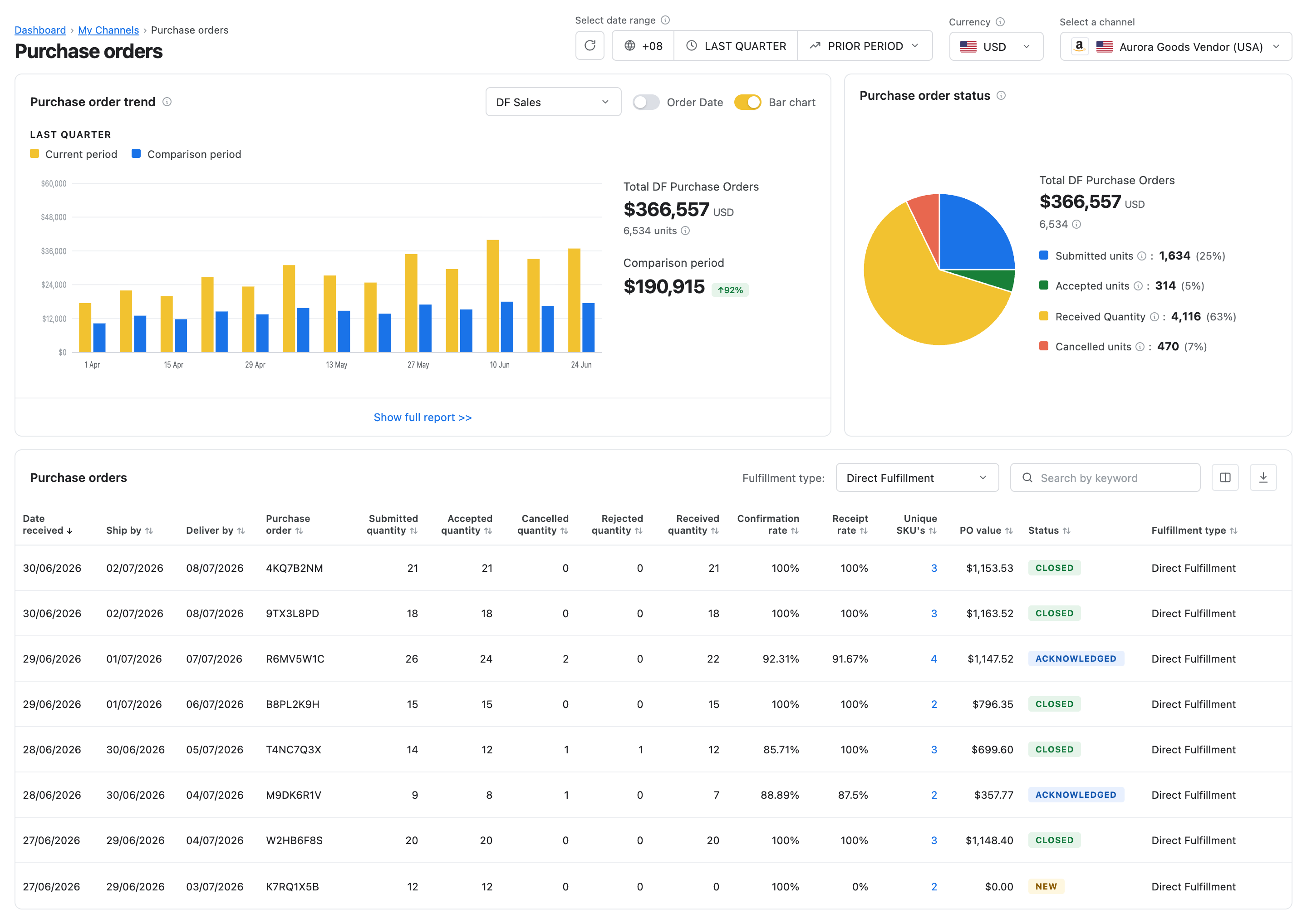
MerchantSpring Vendor purchase-order overview with Direct Fulfillment trends and order status

See DF’s share of the business.Track sales, units and their percentage contribution alongside your warehouse Vendor activity.

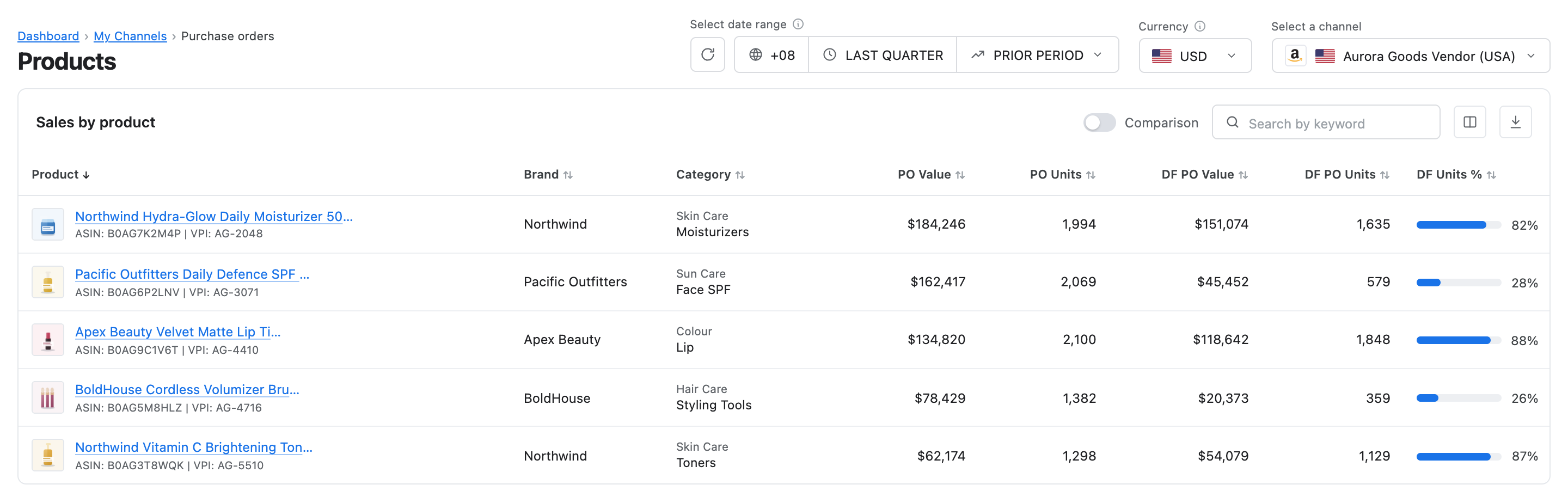
Find the products driving it.Review individual ASINs and product groups, from Most Ordered to Least Ordered.

Review profit. Keep orders on track.Bring DF into Vendor Profitability and keep track of orders, deadlines and shipment confirmations.

Know what DF adds.
See what changed.

Move from the overall contribution to the ASINs behind it. Find strong performers, lower order volumes and changes worth a closer look.

Follow the sales.
Understand the profit.

DF can grow without contributing the margin you expect. Bring its orders into your Vendor P&L and examine the costs and vendor codes behind the result.

Bring DF into Vendor Profitability.

Include Direct Fulfillment purchase orders in your Vendor P&L. Review the contribution at channel, monthly, vendor-code and product level.

Compare the vendor codes behind the result.

Review the codes used for DF and warehouse activity. Account for the relevant product costs, freight and terms when assessing each contribution.

Decide where growth is worth pursuing.

Look at revenue and margin together before expanding a range or putting more stock behind it. A rising DF share is more useful when you can see what it contributes to profit.
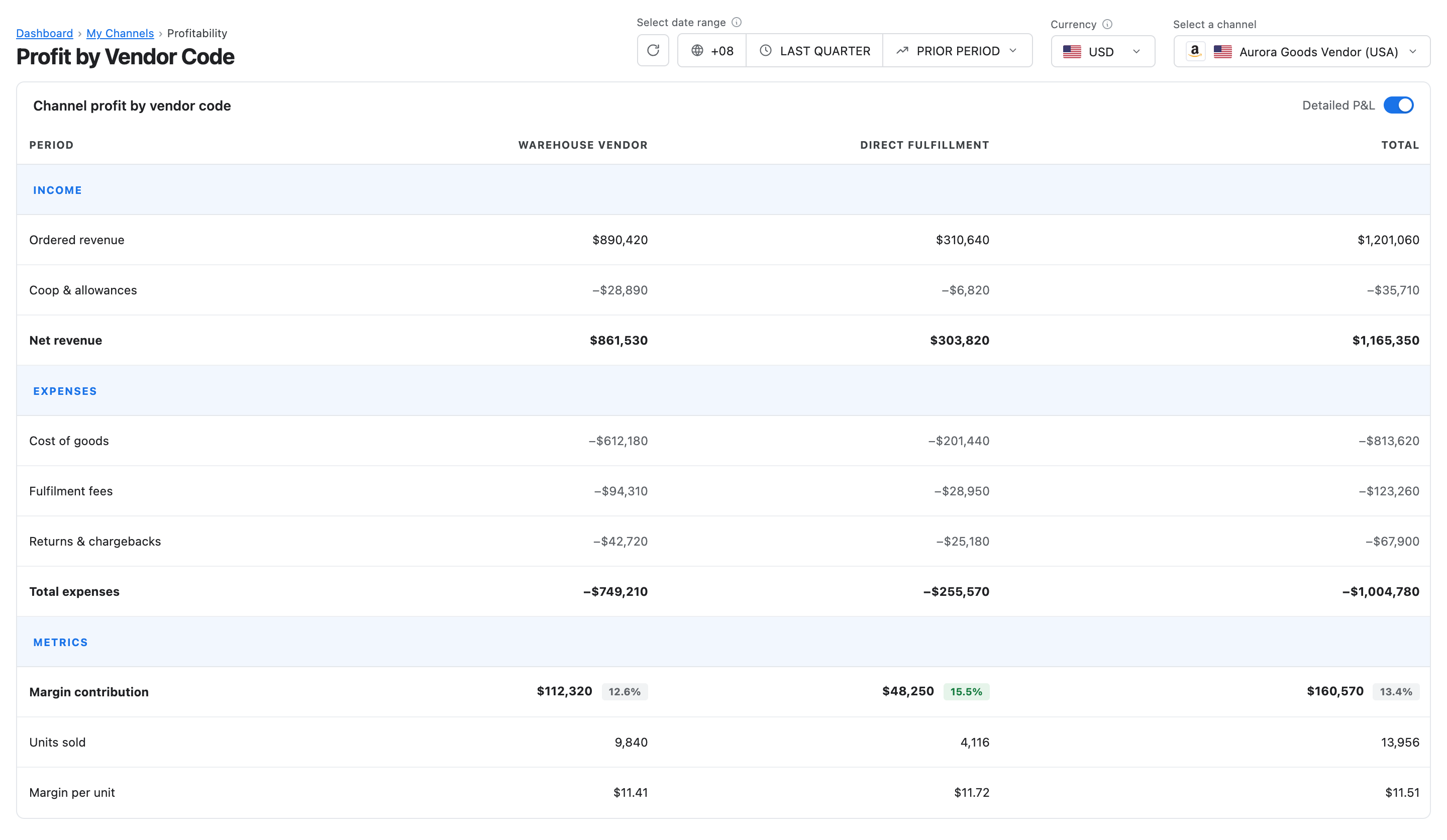
MerchantSpring Profit by Vendor Code report comparing warehouse Vendor and Direct Fulfillment contribution

Keep the orders
moving, too.

Know which orders
need attention.

From the daily queue to your fulfilment trends.

Find the orders that need action.

Search and filter DF orders by status, including At Risk, Due Today, Fulfilled and Overdue. Identify missing tracking before it gets lost in a longer order list.

Follow fulfilment performance.

Review on-time, at-risk and overdue trends. Give your operations team a clearer starting point for its daily order review.

Confirm shipments back to Amazon.

Enter carrier and tracking information, then mark orders fulfilled in MerchantSpring. Shipment updates are sent back to Amazon.

Make the next
Vendor review count.

Bring DF and warehouse Vendor reporting together across connected accounts. Keep your FBA and FBM Seller accounts in the same platform, too.

Review a whole range.

Group products into brands, seasonal ranges or launch cohorts. Compare DF purchase-order value, units and percentage contribution across periods to see which groups deserve attention.

Keep the detail you need.

Choose your columns and export the results to CSV. Use the Amazon or Direct fulfilment indicator in the purchase-order table to distinguish the activity you are reviewing.

Build a report around the decision.

Bring Vendor purchase-order trends, product and group tables, and profitability into client or internal reports. Add commentary to explain what changed and what to do next.

See it in a demo

Keep exploring your
Vendor business.

Ask the Insights Agent

Ask about Vendor P&L and purchase-order performance, then explore the products, periods and vendor codes behind the result.

Continue with MCP

Bring ASIN-level Vendor sales, inventory and purchase-order summaries into compatible AI tools such as Claude or ChatGPT.

Build with the API

Bring supported Vendor product metrics into your own dashboards, internal tools and recurring reports.

Before you
get started.

Bring your connected Vendor account and the questions you want to answer.

What do I need to access Direct Fulfillment analytics?

You need a connected Amazon Vendor account with Direct Fulfillment access and the required Amazon authorization. DF analytics is included with MerchantSpring plans that support Amazon Vendor data. If your account was connected before DF access was added, you may need to renew its authorization.

How is Direct Fulfillment different from FBA or FBM?

Direct Fulfillment is an Amazon Vendor arrangement in which you ship orders directly to customers on Amazon’s behalf. FBA and FBM are Seller fulfilment models. MerchantSpring supports connected Vendor and Seller accounts in the same platform, with reporting suited to each model.

Which Direct Fulfillment metrics can I review?

Review DF sales or purchase-order value, units and their percentage contribution. Compare periods across purchase-order, product and custom-group reports. Use Most Ordered and Least Ordered, choose your columns and export results to CSV.

Is Direct Fulfillment included in Vendor Profitability?

Yes. DF purchase orders are included in Vendor Profitability, with views by channel, month, vendor code and product. Review the vendor codes used for DF and warehouse activity, with the relevant costs and terms, to understand their contribution.

Can I manage Direct Fulfillment orders in MerchantSpring?

Yes. DF Order Management lets you review order statuses, find missing tracking and follow fulfilment performance. You can enter tracking and carrier information and mark orders fulfilled, with shipment updates sent to Amazon.

Can I include DF in client and internal reports?

Yes. Use available Vendor report elements, including purchase-order trends, product and group tables, and profitability, to build reports around the accounts and questions you manage. Add commentary and use CSV exports when you need the data for further analysis.

What Vendor data can I use with the Insights Agent, MCP and API?

The Insights Agent supports questions about Vendor profitability and purchase-order performance. External MCP and API access includes supported ASIN-level sales, inventory and purchase-order summaries. This does not mean every DF report or order-management action is available through each tool. API and MCP access depends on your plan.

See what Direct
Fulfillment contributes.

Book a demo to explore DF sales, product performance and Vendor Profitability, and see how your team can keep orders moving.

Book a demo