Prompts and skills for marketplace reporting.

A small, curated library of prompts and skills for marketplace reporting, reading your live channel data through MerchantSpring.

Prompts and skills querying MerchantSpring's governed data layer, which draws on authorised marketplace and ecommerce channels.

The library.

Every one works both ways. Copy the prompt to run it now, or download the skill so your assistant keeps it. You will need the MerchantSpring MCP connected, and everything here is read-only.

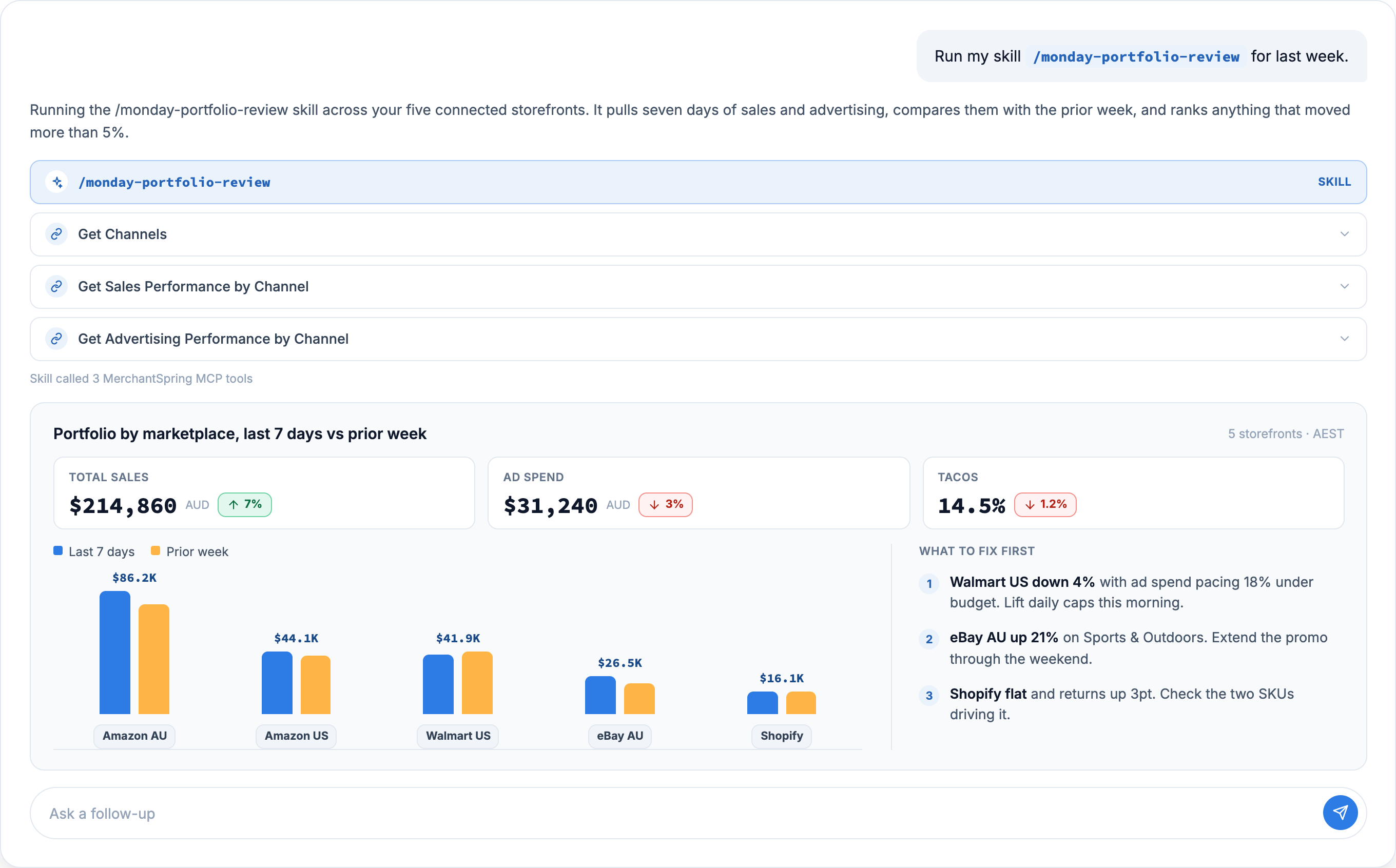
Rank every channel week on week

Every connected channel ordered by sales, with the direction of travel. Seller and vendor read separately, because they are different metrics.

MerchantSpring

Rank every channel week on weekMerchantSpring

Using the MerchantSpring MCP, rank every channel I have connected for last week against the week before.

Follow these rules exactly. They are what make the answer checkable.

1. Compute local-midnight epochs yourself for the window boundaries, and state which timezone you used.
2. Call getSalesByChannels once. Read sales.value and sales.priorPeriodValue per row.
3. Rank on sales rather than filtering on healthStatus, so no channel is left out of the ranking.
4. If I ask for share of total, compute it yourself from the sales figures rather than reading salesSplit, which is a share of the returned set and rounded to whole numbers.
5. Rank seller and vendor channels separately rather than combining them, because ordered revenue and transacted sales are different measures. Ask me before adding them together.
6. Label each group so it is clear which measure it uses.
7. For the top three rows in each group, verify the sales figure a second way using getSalesByProduct with includeNoInventory true and includeNoSales true, and tell me whether the two agree to the cent. If any disagree, say so instead of picking one.

Then give me the direction of travel in three sentences: biggest riser, biggest faller, and the one channel I should look at first.
UEsDBBQAAAAIAAkfE10ZCH5OqgQAANIJAAAIABwAU0tJTEwubWRVVAkAA2IphWpiKYVqdXgLAAEEAAAAAAQAAAAAhVZbb9s2FH7XrzhLXi3lsq0LjGFAG7RAgLUIknV7HGjqWOJMkRpJWXN//b5DSYnjtNuTIZI6POe7yWVZFk51vKag3K7kPYdDqVvlHNtyZN6V3uXfouaog+mT8W5NDzhM+TBpj7M6cU0fOcib6bEPxjU0V6HNgaKyHGnrAymSYqQaZVxMlFqeFjaMXV5RZGsZx1xNe3Y13pC+UDxyr4JKbA8rGk1q86vJ9xT8GHE2mK3BMYWD6KimUR0q+hw533omRag7LD3FsxWdKWtlKSZcnBfG1uj2qW0Taehlufchbb01nvaGR1nRwce4oHRWFR0nVauk1gVJJzFDdHZVXVaXZ1iyKqY/lw6xcX15/aa8vCmvbmS3HzbWxJbD+gRA7GGSFMxmQItf2W19B1AacNem1Mf1xUU3H4n5SGX8RR9816d48X/sltBBcf6C1xmHTI93+bco3p9wvpzyoeaA54XsI5JqE3AWmJDfUgpqz7aix9c8s3rJ8oa1GkAgahxIBSm03eISlwiAB6NjVRTvBmPTXGaWAFo4UeKiNkXW7JmU1n5AFXR0dUNvh2bAnpCCeufn9EerIExPKmLee3AnLRhMhCYtT5qNOwP1WI+W5e6/pALOZ7FlYbZyr3HUW1xN710jHKP+z9+VJU2krGNSIVFZ/lJ8jnJcXjzp/OPt/So74ISUO2qB4xEPcrHo7D/thfs/eGv9KBtANgxiS/5H6WThlt8WoEdBoFO7jD0GjCOo0i3rndpYqXJV0S1GGACN9VrZsjO1M02biHuv20gHPwRYefsEyGhA8kgbAF+rYEQgAhwgSHKfGC+Zjr94x/Iygfi6Kq5xj9i04fQoqnp3uJ0NDPI0V/SQRSNb1V7Zgaei+RkA+nAPUfj697zVYwiERVV8X006B/9TMEFx8B/6VI620BNn7LHdsrKpfUSTAxqOnpw/zgfLW6hoSFnYGFKIEt8VP1R0twVJiyRiK7DKKZ+UXYG3CTyTjpCCKCZtTWFpmiGc9CYWkc7yicfemrSasUMz6ugW6YXTEFwOzskfQaDHM5Q9tt4yuaHbIKyq4scZj9fZu8TlkS9fNIQ5NsbN2u2eLbukQYBq3cwKnO+iymKdJjy1tIoycEVvAVrHs2RJ1fVSH61DCLi8Kt5U9KvagAVWmL7BbL3QAzyBhLaswgzMXFZ20BiG/amiD4tJ8fVIbWCeviHw6XO11ZQnh1eMvPjCoKY09yzP++DrQacp/IzTdqj5k79zgAEZjmphRuNpL7+Y1ydHAGMr448tzzij0RFp1EijIE8WNMpliSl3AIYxb0Kg6EhQgPXFF1BCb/Ru0rLYFgZ31EgEdvytaBYYJlAiLmG4LK5pY5qGkSfBRA6rp8etEsHMfaOcmPc5oWLrB1sjIDwCCYdNiKl6EYAQWY4/Sd1PPnEsCjE0PkoSR1jJKQoUAEcwSXDy2TAIp7DjhHDVT3EepwHnUMtT8HxRlprz8Gn++6LsN7MOZoYxods+E2kQd9N4WRmYr2CTacnBBQ07eDwOXT+BOKekmPFrapklPakUd+CPhaScjP/Afw8gowPmcZrj9ZcApcJe8H6OfWlNDejIJaNVrvYvUEsBAh4DFAAAAAgACR8TXRkIfk6qBAAA0gkAAAgAGAAAAAAAAQAAAKSBAAAAAFNLSUxMLm1kVVQFAANiKYVqdXgLAAEEAAAAAAQAAAAAUEsFBgAAAAABAAEATgAAAOwEAAAAAA==

Report one channel's week without building it

This week against last week, with the SKUs that moved, and a reconciliation that has to pass before it will report.

Abhi

Report one channel's week without building itAbhi

Using the MerchantSpring MCP, give me last week's sales for [channel], against the week before.

Follow these rules exactly. They are what make the answer checkable.

1. Confirm from getChannels that this is a seller channel rather than amazon_vendor_filtered. If it is vendor, stop and tell me, because that needs different tools.
2. Compute local-midnight epochs yourself for the window boundaries, and state which timezone you used.
3. Set includeTax explicitly and state which basis you used, so the figure is reproducible.
4. Take the headline from getSalesByChannels. Take the comparison from your own second call with explicit dates, so both windows are the ones I asked for.
5. Read field names off the response rather than from memory, and parse money values before doing arithmetic.
6. Get the SKUs from getSalesByProduct with includeNoInventory true and includeNoSales true, so SKUs that fell to zero still appear. Those are the drops I care about.
7. Reconcile before you report: the SKU rows must sum to the channel figure to the cent, in both periods. If they do not, tell me the gap instead of reporting a number.
8. Tell me how many SKUs the channel actually has. Do not pad a top five if there are three.

Then: the week's sales and units, the change in dollars and percent, every SKU that moved with its before and after, and two sentences on what happened.
UEsDBBQAAAAIAAkfE13q35fQ8wQAADQKAAAIABwAU0tJTEwubWRVVAkAA2IphWpiKYVqdXgLAAEEAAAAAAQAAAAAjVbbbtw2EH3XV0ydh76sZDttU2NRFEjTC4IiQRAn7UNRBFxxtGJNkSpJebP5+p4ZSetLG6CAXyxybuecOdy6rqtgBt7SgfnGH+tsPOc68RhTqbuY6hi4bnsTAvvKcm6TG4uLYUtv9Q7hnJ4P5lMMlNl7TrTc/jJrTjJ740IuVHqeP+wYeXlDB1d64ltOR7r+9T3OTaEh3rLdUOI2htZ5F/YaJ+cpHvKDZEsdKrEYv2SluXPENfQ+M+Ebnc2jkY52tqGzPh7IOotuyEbyBvnkihwtV8fJZ5b/NWZJqslk3FxQ6aypBi7GmmK2FRHGyArL2WVz0Vyc4ZMk/oDvrnNscfD04umz+uKqvryS03HaeZd7Tlt6xUlmKddjQuM4w/Alud2EOlt6vusdvvVx4NHswVRfypi35+fDEpY1rHHxfExxGEs+/z9c1mC+enKfxUe8CT1xKrSbnLdChCtV9a53j2g9wbcQutCVH/BpgiVzx6oRBc0XeoObkUaT80qhQz7n/YJ6U1UvVjjY0u6ogDT02wLsqRFD3t3yIzDJtG2cggxIl1f0fNpPuCpMIO+TJ/S79ID6Jt9U1RuMwmjL5Q2Bas+zzvKNdOOjsTrHX5IB91UOco4AQSfQ6NEJ/RT2Qizyf/dFXdPMyTYXA5jr+vvqfV5V/ajVVy/ebGgvMwx8ByvomEUo5f5YOPpz87m1Qtmfo/dQOA6wAGmSWP5o2uKPDb3r+UgGIB+UHXPDmsCEfNDN5fbG7LxkuWwIuHcuDdRhBNpzeTEXX6gVnAh/5tHeUzJIKdCYQEadAVsQbEwfOucLJ7YNveyEZkTPJxvZqVHhLUgGADaYpzVT5rlYYLYZS9t1iA9CWfS5qZ5Kk8MIZYCf1vh6cDa4fV8I2mn7TMc4JbTXncg6ONQ70A6isCY5zrM4QU8RUFwLBbuBP8lCIJjQgW2qrxq6hhpcaP1k+Z35CERH71oHUP8VvzPZ5VMwRotauXP7SdStdpKinVqnSH8NVlYeejYWpscnyK+F+h+OK/L3rraYGwNkCFsvy6QUD+LC2DJLQMMvFru0SvAqmRf97CK+z1BklYNkxMiZXoq0sVXAq6m+aeAPkD32zFuSdyJT7Dq9nTiPMYjC7tGtnQw8xHSccUWLuDIg9ZFujZ/4tOU26nomdAgfdW1TPWvol2Xl1EAeYfBGMSvzTAsTr+PLAAXBJ49U0sRa83Smgfpdh75zpU40hq3/xCmCOllvM45skixIRMMrJDbFUTBp5YOBaGBH3woos5HxOoyQPdvV9uF7NYhZ5GmQavffrEUM61eMsBEHUV5GOFu0WZekyL7ikQoRF5bV0JC9GUn2X+iJ3d2zh3UM07BjsHeFaZYIefEGE44rBneNwBcmKOUoRtzQj1oJrIldy0Z2YkdO+0grLInFH+AkYXtyn5NLCQFTcAU6W8vsWUazcCWIYVYFjE9H/q/XfyG4nJSij0cH45glVQ7gDNEcWpFjmK2sFwKD7Op914W5qOeK1b+OUH9ViaDxEIoZ4otat852gBJZ3yLdpMGkGy5w9JbXNyTPUy+W6oIOOBdSZAS5qD+OjP+s00JCsKsHFjCPxQbWgT2p2Ok+qaMIXFhICEjzyqukHi2uu0jIrAt/MMd7L6hbf7UIJDL+W/57cokHIJfnOf79/CBVuhWckTBwK++tgj+ho4AdNZrtH1BLAQIeAxQAAAAIAAkfE13q35fQ8wQAADQKAAAIABgAAAAAAAEAAACkgQAAAABTS0lMTC5tZFVUBQADYimFanV4CwABBAAAAAAEAAAAAFBLBQYAAAAAAQABAE4AAAA1BQAAAAA=

Explain a sales change SKU by SKU

Every SKU that moved, and how much of each move was paid and how much was organic. The split has to reconcile before it reports.

Abhi

Explain a sales change SKU by SKUAbhi

Using the MerchantSpring MCP, explain why [channel] sales changed last week against the week before, SKU by SKU.

Follow these rules exactly. They are what make the split add up.

1. Compute local-midnight epochs yourself for the window, and state which timezone you used.
2. Call getSalesByProduct once with includeNoInventory true, includeNoSales true, includeTax set explicitly, and both prior dates set. Every row returns current and prior in one response, so you do not need a second call for the comparison.
3. Reconcile first. The SKU rows must sum to the channel figure from getSalesByChannels to the cent, in both periods. If they do not, report the gap and stop.
4. Report each move in units and revenue. Do not present a price-versus-volume split.
5. Split each move into paid and organic instead, using adSales and organicSales. These are present only where advertising is connected. Check that the paid delta plus the organic delta equals the total delta for that SKU before you report it, and say so.
6. Quote traffic once for the channel from getSalesByPeriod and label it as channel level. Page views, sessions and conversion rate are channel measures, so do not attribute them to a SKU.
7. Only cite buyboxWinPercentage if it moved enough to account for the revenue change, and say by how much it moved.

Then: the channel change in dollars and percent, a row per SKU showing before, after, delta, and how much of the delta was paid versus organic, and three sentences on what actually happened.
UEsDBBQAAAAIAAkfE12leGmNKgUAALkKAAAIABwAU0tJTEwubWRVVAkAA2IphWpiKYVqdXgLAAEEAAAAAAQAAAAAhVZNjxtFEL3Pryg2By6e2d0AIVohpLAEKUIJSzYhB4RQe6bsabbdPfTHes2v51X1eOIlijjZ7o/qqvdevXLbto03O76ijfVDm0du011J+GJyuwv3PDQDpz7aKdvgr+jlw+SM9WSoH4337L5MlIzjpL+3TLc/v6f1QT5WlCZnc7Z+S2z6kSQcWZ8DTcYOZPxAIW6Ntz1FvmdfeEV7m0dCFmQivu0462YffG8dD4S7stmzz7TmTYg46A95lDdswskpxMxDR+8TE7bpbI9C9OXhbCW/DjTg7ZryEMNUVy3SQ8rHKvSsJnmfjjnKksSJSTPfGOfw/axrkKQZTDZXDZFsK05nl91Fd3GGJWdS/hPrdmN5wMbTi6fP2ovn7eVz2Z3K2tk0cryi1xzl9Xw7RZSDPVSdo12XHLD7Yj1arI1hx5PZgq8x5yldnZ/v5mtJr3U2nE8x7Kaczj/LaAvSmycnXH6GwaZ5icT1K+UFx5XWP4Y97QpgC5sTdvcmfSR3OSKrM4odvQN/KgwasQxCF3qPjGKrEpm6prk+ggD2kZXA0NFvM5xktiggZZTgLJ5/DCGZvg8FSgmeLp/Ti7ItOCr4I+6TJ/RBSkICJt01zQ1oYlRp0wq5kuOsSkt31jlywdSS/pIIOK/akv1Zep4qlC/9VuhE/O++aFuqTFylbGKmtv2+eZ/kuFz8T6qvr29WxDMhotLf5/764xE5g8qJ9sx3S+0STRcqfKsTApHHT8E58IBD6IhYJBQ/mD67g1JxQKPhupJr7rjWrOyYYaAyIcJlR9coAwwAh964dmcHb7djJpDUj4kOocTEbrOAsofwwr7qBLVneUA6LNsd/xM8yw0qCX3aPEVwdBJtOd9KnT8cbmIYSi+k9VztwPrelYHfhFceLoFuOFCOYhbLhl59vPjOPFACiYKp7S3qrfmsAyICc6SKpsUtHOqo6jwCqMi5RA+8S4ziMnKnHgcxknvkNAWf8FIKWsgQyIdMnkWPCAc1D9RLUUc8esAHP0vBd81XHb1dBL+xMeXaEkIa3k/oGHCaym7xuqoDnN0WULWBpE7Quq676dQZBYO5TvRJGFJHrzaye5hzXc39pTe2ZpqJCmD7a0lP904tm4q3ufre7NQd/VjLnoCH4iQo9dyKA8Jt7oMru1lKXfNNR7cqqv+bAyJoNrCYoo1ihsrsyRFdUMgSq3aPCQTvDtAZy0gYkEW2aZ4KQNtzr2PheuT+rnqZ1K7vD+wysncl6doxlbrMfxfj6kYO2bh5uTKLKNpr1bZECzOuNs/iNweopGuedfRrCeIv0Ww2CK7iXuRxZPgxtTdKnsZxZo19acq0nHYgwnV0g2FA95b38K3ESaZPxQtVz9OIorSgYHW8u2OTIKakGp71a/Lss5KTqs9UC/m2o18EWzQRLLoc1uHhg/XITrQmr9uNpKazgdiHsh319my+xypn4cxG9hEfONUyKI5h4DogGGP0FJ55PEGNAzzNzHN4qnkgnrYvfionCTGF/qMnmk3muKrsfTrA5JlK7DLAqo6PaqhX8hgZmsZzDP6SzBV1TtgpVAKIRjNN7CX/U/tnXBXzl5nzBipITfMWIm9FsZ2s6AxR5e7xr4e1mcVUYcnxjjOGAtQy45kqNrOVAwzVsT6kFAuVQf+sGfdZhw8lw89FrWq2du1mQrQ/4XINw3gBpbq3AA3lwZM0rozHXvoI60dXWnxvL4wuY/z0L5mW/xb9ZCPvAGGqdXw6BxEq3gtZS99qaqYgI4//g0aj/QtQSwECHgMUAAAACAAJHxNdpXhpjSoFAAC5CgAACAAYAAAAAAABAAAApIEAAAAAU0tJTEwubWRVVAUAA2IphWp1eAsAAQQAAAAABAAAAABQSwUGAAAAAAEAAQBOAAAAbAUAAAAA

Audit ad spend against what it returned

Spend by campaign, ad group and advertised ASIN, cross-checked against three other sources before it reports.

Abhi

Audit ad spend against what it returnedAbhi

Using the MerchantSpring MCP, audit advertising on [channel] for last month against the month before.

Follow these rules exactly. Spend and attribution need handling differently, and the rules keep them apart.

1. Confirm hasAdvertisingConnected is true on the getChannels row before reporting any advertising figure. If it is false, stop and tell me.
2. Compute local-midnight epochs yourself for the window, and state which timezone you used.
3. State your spend basis before you quote a number. getAdvertisingCampaigns, getAdvertisingAdGroups, getAdvertisingKeywords and getAdvertisingByChannels cover all ad types. getSalesByPeriod adSpend and getAdvertisingProducts cover Sponsored Products. Show me both, grouped by ad_type, so the basis is visible.
4. Verify the hierarchy adds up. Ad group cost must sum to its campaign, keyword cost must sum to its campaign, and advertised-ASIN cost must sum to the Sponsored Products total. Report any level that does not.
5. Key on campaign_id rather than campaign_name, since names are editable.
6. Compute click-through and conversion rates from clicks, impressions and conversions, and show the counts you used.
7. Sense-check attributed sales against channel sales for the same window before quoting ACoS, ROAS or TACoS. If the check does not pass, report spend, clicks, cost per click and impressions, and tell me the ratios need a wider attribution window rather than printing them with a caveat.
8. Report how much of the spend maps to an ASIN with sales in the window. Join getAdvertisingProducts to getSalesByProduct on productSku and give me the covered percentage, so I know what the per-SKU view represents.

Then: total spend and its change, a table by campaign, the three campaigns taking the most spend, the efficiency metrics that passed the sense check, and one sentence on where the money is going.
UEsDBBQAAAAIAAkfE11zIFE0owUAAFgMAAAIABwAU0tJTEwubWRVVAkAA2IphWpiKYVqdXgLAAEEAAAAAAQAAAAAjVZhb9s2EP2uX3FLv1pK0m1dEAwD3GAbuqJdEDfbh2EoaOlscZZIlaTieb9+746yYycdViBAZPJ4vLv33h3Lsiyc6fmazNjYVJqmjAO7pjRrY11M5bY1qcRG4DQGx03RcKyDHZL17prmcojmvfnHOzLNA4dko3VrUicki/SOQ90alxZDkB35dtxR47eOkqfa9IOxazfDeVoHPw5kcHTvjBuaL968n1Hg2rvaduJjMXgXfcDebfDNWKdIU7xkuk4cpd3AUR1FdpHLuuV6I0dNSsEuRwmflryCE/o0+iRb8xu/IB/o7tf5oqL7yIRtOoM3zeZsRmdiIv/FRP5vW1u3hxRwIdxtTVR3vXe8E6PjugR+sLyV1Q/qqyp6TqYxyVwXRLCLWtezy+qiujjDUgdvH7FuV5YbbLy8ePmqvLgqL69kdxiXnY0th+snZcYeypVT9didL1uLtdb3PJg14G5TGuL1+Xk/HYt6rLL+fAi+H1I8/1JClKBQ8WKiwr5YBzzEnLBxMC8Wur/cfTHydfAxZgT50XFqAzP5hOQp+jHUwHsCVK8bfEixKoqbfRlYL5VCVPTbVNBH2lBnH/gpV01d+9El4fHlFTJcjzAVBOD3xQv6XXIDhU3cFMUtgGJEZeNMSNSxhMgUNxaM7DxSlOT+Eg+wV2rJPg7gIuto6BAJ/ejWAij8f/9VWVLG4jomExKV5Q/FvbJIDj4J9d3N7Sxr+ESHiPyPSXF/6p3CJ6Fmao8qydNKrh8u/8l3nd/KDlQQxg615b9NnbpdRRk/RepIS45RTVzUqEAbu1pxYIcDMzWVO7KfDfMgP3syA7LCZZcVAaSVDT0cxPlj9Fh1XAtwNlIKI0s64mnN6SYnFSkgzgn3DLoC53YnZVjZ9YjE6M1KyAFvK9NFnlFMPpMuMVDqkfpLCaYfQBeAVpuu7G3j7LpNBOd1G2kHrkXuVgcEt9ahl+U0ARQO5q6QbM9oiywnaASdq+JrVE8txMkklKWJ9sBcMZV2xCCkG/slh0qSPa7JvtfMnmzMm59FQs/W3/Ju60OTm+Hp1uvdoYq1x+pJ89SLFwaQvd7dQi5elPmI/amnQxvOfp73ZyTeAqieaQnJzrLcsyJN81EuBBhe65kLgr8HuF52wOSbSbA73W8tBwPuy0mkNQ4Vzff9o/bCbtFYHHuRppWYDn1mk2vxf2anXaiULvT8iITymTmUfDJdRXdKReVhxw8Yd0l6ReMhAOdB+m8rAjDC5/21H21DwWg7g+3RuoxnFMe6mkm+85RhKN1odV49MrbubL0p0Rn9uG41DQyBaaiIc5xdoaNkOzDF9kPgKLvxiXWc+NzmLkDaB+MRlb8Doo+T9dAKUIoonDk0l/24z6t7zUTkMQnnc1N4pjNY2qhOSdWtRqF37atIg4lxNqk+q2l2SE3xGlBMXdBkjrKdHYs+NyeDNhZzGzMIrRE5HPW3KdhjhKTxpqkd9zCQlgrYHtgA4KsDB5T3IxqCz0lk2fdmiDo7nE65fDwXybqjvlLRLx4L/yE3ODhSaV4VUg35c7EZs1hltk2JqkKRJGpTo0HjMaDKe0Mbh0B1XIsZtsvF23uS54qUGJWDtQzUDy3jhaI83896Ka4oCFURd4aUmqczPg87mdmPz6VkNvtx1gteE4bym1crW1t29Q6BA4Y6ZgkJ5pznib7sMicyntJsJUoWqQhmgIr34w1qQ09Ze3nlnAxXyUBGq0z092i9sSjuGM8e72TaYUUntLraBisaQtW1gfcmbDhhcOO66akwFWiadROS+SKVrdDW6+NZugQsd/nNKKn1ZpOj9WOCnLXqAqM0wZwgG6GR44Jtfvck1TQ4hKqMvfoV1WhNsD7NPXxEeT03eJvujh5JqEcWjwha0r/jT6MN3AvSOY/nrwy4CmCQKGw/nbVfjogIcqiNevsXUEsBAh4DFAAAAAgACR8TXXMgUTSjBQAAWAwAAAgAGAAAAAAAAQAAAKSBAAAAAFNLSUxMLm1kVVQFAANiKYVqdXgLAAEEAAAAAAQAAAAAUEsFBgAAAAABAAEATgAAAOUFAAAAAA==

Find keywords paying for clicks and no orders

Keywords taking spend with nothing to show, keywords enabled but not serving, and duplicates bidding against each other. Ranked on spend.

MerchantSpring

Find keywords paying for clicks and no ordersMerchantSpring

Using the MerchantSpring MCP, find the advertising keywords wasting money on [channel] last month.

Follow these rules exactly. They keep the findings on figures you can act on.

1. Confirm hasAdvertisingConnected is true on the getChannels row. If not, stop and tell me.
2. Compute local-midnight epochs yourself for the window, and state which timezone you used.
3. Call getAdvertisingCampaigns first, then getAdvertisingKeywords. Report keyword coverage before anything else. Sum keyword cost per campaign_id and tell me what share of channel spend the keyword rows account for, so I know what the audit covers.
4. Rank the waste on cost with zero attributed_conversions. Spend and order counts reconcile exactly to campaign level, so the ranking is checkable.
5. List separately every keyword with keyword_status enabled and zero impressions. Those are not wasting money, they are not running, which is a different problem with a different fix.
6. Flag duplicate keyword_text within the same ad_group_id where match_type is also the same. Those are bidding against each other. Do not flag the same keyword_text across different match types or different ad groups, that is normal structure.
7. Sense-check attributed sales against channel sales for the same window before quoting ACoS or ROAS on any keyword. If the check does not pass, rank on spend and cost per click, and tell me the ratios need a wider attribution window.
8. Report a bid only where the row carries one, and do not infer one.

Then: the coverage statement, the keywords taking the most spend with no orders and what that spend totals, the enabled-but-not-serving list, the duplicates, and one sentence on what to do first.
UEsDBBQAAAAIAAkfE10DmGUWcwUAANELAAAIABwAU0tJTEwubWRVVAkAA2IphWpiKYVqdXgLAAEEAAAAAAQAAAAAlVZRb9tGDH7Xr+DSV0tJuq0LgmFAlq1AsXUrkhZ7GAbjItHWzdKdeneK4/76feTJsp0WBfZm3/E+fiQ/kirLsnCm52taWdeUG95tfWhi+TAGZ926rDtbb2LRcKyDHZL17ppew5JuevPJOzLNI4dkI2xp/5gGs5P/Kx8ov6etTa0fE+GaQ1wcTNmZh44besCl84kih0e8XZCBj2Yc8NwkPtjXvh84Cbp1lFqmCPJgQevgx2FBwbgN4MAsDgwIgVEO1Jhk8MIkClx7V9uOIyVPtekHY9eOOn7krqIPkZX52dbEBChgK9TZgs5mGhIP+MI7UOQmsgl1S4lDr/8dr02yjwfmR0YfRw47GjjATW9czWdV0XMywvC6IEJGoyb67LK6qC7OcNSByxLndmW5wcXLi5evyour8vJKbofxobOx5XBNbxkejEv3Q0CScIdQU7BIr//Sbet7Hswa5W9TGuL1+Xk/mUQ1qaw/HwJynuL5VwVSQkfFiyyNr+hAyoG0ZRkUxW97y2Q2YplrNiU3tXKECsXWb/+3ZCI92KYRBLM21sVEbJB7oHKo6O5UJlVR/DzaLinEPs30sHuWsBnKUCe1NXXtR5cE5vKKbsb1iDspDfBevKC/RGzgb+KmKN6JmqA/C/UjHx2nLN+N7TrqvMlS/VcQYK85k/ucBGh96OCafnVrqTTwf/ymLCmX5jomExKV5U/FB21EefiM+dvbdwttcb38YteK3uWg9453EtPfAuC4+0flJ+dJPL/2Xee3goNOCaO0ET+ZOnW7it63eLphHtSN+ANiFLCVXY8Bpjs/ouUwOGrJG+AuK7r1bmVDT62JNwdmOHVcSwtaCCSMLDACu+Z0m5lFCn5b0ZuVCGFBMflB05gYSe25Kl4KeD+MSH3na9OVvW2cXbdQw+DrVumEyN1qTvgWnEVuAoO84uG2tdLZtmcMPNYAxsjQzLcAN3AEPse0p3kSEXKIYAVU98xmr3sIETxQu6kI6FbYoB/pgUEIhXK7rADEyhXdj/2RKWqCITIPsKVtjoMHb8gvtgYwfkVTLacWk0j3QEhhnKUMr8ijpze0cSiyYqhixsamTC9WxXe5g3LCVNgojRLS3v3EAapPee5ws8QMmmYaIr6f57JOAVK/8TCU92L6fDYrMXEpQ17bAvug5Xoj86Aqvq/odxtlHgwmoHCAwKuwmwNVbtOfpdR2PAwT4aO0bT9AphPX962HxiWDMmhOGkTrupvvwuicDqGsFjAz1NjVigMjq+hTeOkzg+OLlX2qilcVve7M+vN1t0z8lFN6uuyWuuyk3ltMM6bepLpdpt3A6rib0iTWxzF8bSD+4jWMlfCYPZ3QMHXwMR5xV68kXqNMtMPFfhvHRd634ORk00F8aOM6YQ5UxQ9QArvIpVbwSC15p84kZ93q6b5LlV5u1X2rfBy9Vufm1t8Ln7s/b+5FlmihfSA6KeR59tl4jhr1YGLMnw7PPhzmFpPttTjprqxDfBABgkVAoCNy3gcCAU0Eq+Jq7nMjRYATaDOXTmEQRG1CsJJIx9MiywWxDkmVU0xKDFd8FCj//ZjQCdUj6Yvjlp73qZz1EsTJYp3Wr7qZGtzsTZJP0E9Gm3oDqz6V4FJOixa7bxprR9s2k5b5GMGG8VEjqdxOGxDB6DCsTtaW+JOlJbvyDw+Qorhj05SSnkpOdPJpmrbBpvy5JgMb0gsbTliJ9byEY07QtJCmfsmO5ib1+gFrumlPybEy7M0mVwKfqNgVmEV42Iy1Rfg5sNwqjgu20i8575JBLOs49oorolNhSe/ndYcfUeYa8mx2e6Fa7YiggpA1IuHf8cfRBq1kzHF8vr/1Q4cxnut5MQo1M8qCSVoGoP0HUEsBAh4DFAAAAAgACR8TXQOYZRZzBQAA0QsAAAgAGAAAAAAAAQAAAKSBAAAAAFNLSUxMLm1kVVQFAANiKYVqdXgLAAEEAAAAAAQAAAAAUEsFBgAAAAABAAEATgAAALUFAAAAAA==

Check what each channel can actually answer

Which channels have sales, product, advertising and profitability data ready, and which are two views of the same store.

MerchantSpring

Check what each channel can actually answerMerchantSpring

Using the MerchantSpring MCP, check which of my channels are ready to report on before I run anything else. Do not analyse performance, just tell me what each channel supports.

For every channel from getChannels, establish and report:

1. Type, from the marketplace field. Filter on amazon_filtered or amazon_vendor_filtered, which are the live marketplace values.
2. Whether getSalesByChannels returns a row for it.
3. Whether getSalesByProduct returns product rows, calling it with includeNoInventory true and includeNoSales true so vendor rows are included.
4. How many SKUs it has.
5. Whether the row carries advertising fields. getSalesByProduct adds adSpend, adSales, impressions, clicks, acos, tacos and organicSales where advertising is connected, so check for those keys rather than reading a value.
6. Whether getStoreProfitAndLoss returns data for the channel. Where it does not, record it as needing setup rather than as zero profit.
7. Any pair of channels returning identical sales and prior sales for the same window, which usually means they are two views of one store. Flag them so I do not add them together, and note the check is window-dependent rather than conclusive.

Then give me one table, and a short list of what needs connecting before this account is ready to report.
UEsDBBQAAAAIAAkfE12r/Lt1tQQAAA8KAAAIABwAU0tJTEwubWRVVAkAA2IphWpiKYVqdXgLAAEEAAAAAAQAAAAAnVZdb9w2EHzXr9g6ryf5o21qHIoCidugRpvAiG3kMaClvRN7EqmSlAXl13d2qbv47BQF+hAHJpe7OzO7I5dlWTjT85rqlutdObUmlf1c1q1xjrtY1saVxsWJQ9FwrIMdkvVuTW/GxiaaWlu39J6DxKfbIVi3pf1bas0j0xjNQ8cUTcdxRUPwzVinFZnmkUOyUR4Y18jFxibzYDubZmpMMvTAGx+Ywuhcjprxz3RztEgkbzad2dLGdokDN/RoeYrkN5RaKdfjR5L3CZBo8mPXUONH9FLWfnSpovvIhAp0IqBzycbTtbZ9spJjAXdAM/mwk2OjyHs0U2uiHDqTjSiFH8sD4n5I80lV9JyMJF8XRMAclb6T8+qsOjvBUWdi+oxzu7Hc4OLi7OJ1eXZZnl/K7YCGbWw5rJ+xjLvauxTswwiU37htfc+D2ULZNqUhrk9P+yUkakhl/SlIR5Px9L+1LzEnxSu6kkBSvth8JYcQCTrSaLpORNInxadj/nQa/scYBDbNnAXPihgRdfL/JnhVFG9HDIW+2BNLD/PzMTVbY11EGHUWnS1qknd0fonx3o64EzGQ79Ur+iSYkycTd0VxA81Y1V4RBqjjlHvY2a6jzptGa/8lGRCvQyb3eIC61tHQoTT95raiLfL//F1ZUhZjHZMJicryl+JeWZGHzzp/f3Wzyvu6MAIOMI8HpoUgZU0aDjz4oLCWfbqWjZJtyu3gAVf0qyfn07JfTAMHxPbG1bzKOBIDGih+qX0cB6kQgeMdgDIoP/RCG4CiLaerpbcVMQDqTCtHubt1UZxXdDcPqKYvBHRvwo4TqKqxppa7pqJ3uuuCxfTmi3efD8uPwsvRI7vGh8PN6unQIKtq/TT1o+lGRvMXFTRmhATp91bm9O28bxt9pjE4UEvBTyqoTVXx/bfe3OTZPjwZ9r/7CfBrrIhOATzJphbTUHdjwx/8tUPnmF+IFkZWcg53mjmfR8y9ItR8CmsJa6rih4p+R3u9WOXtH/dRqrQG4H782qiQIBhqE4JF1qcbqDTH6htgTNNI6O2A2rK1t3mPbT8EjmJpAq2z9U6sufb4meQ/heHD1jhbZxATeuCjomKZHizXSdQCvjzZeWk8hnHHMwQwS/dwGplt3eAsXlW8PtZBXOBGjeSNa/708at8aij7dVxmVN8KjfgGeHSIPVjhQe1DI2cGJ8xaLyLLcNQJLr9w8IttVcVPFb0B94OxQZayPh4fRdtAZYspyFa4mJ5FS/n3fXPqZ5OF0tN+hMeY/bVnOKwEzS+t0Lu9C9I7+ToiqhdOr+XTphveNPkw+a0ylp0VV7yQIuRDk1y7bFgkR89HuCEYZi5il7D1dy072upesTYgC845r6HYiv1g4ZP0p/YhfB5EF1IWZ9LP596HbXzuYdWRT6IrdUkx5w/oPhbFR8SX3nVzJSfqbqrsFGyS/fE0+zEcbf9SLWYYcEbRAN4sVORCyrEw5/UvH4N5udtTr2h6s8vU+TENo+x93nh7IEHtEsQUbJVCOGBS6TE/cew1rziYci8es7HbUbYEEweW8N0z854juzAjhMjKC/yP/PdoA/dQKWYcLz8YSBUeRe3DrmV9RnSkA6nZ/gFQSwECHgMUAAAACAAJHxNdq/y7dbUEAAAPCgAACAAYAAAAAAABAAAApIEAAAAAU0tJTEwubWRVVAUAA2IphWp1eAsAAQQAAAAABAAAAABQSwUGAAAAAAEAAQBOAAAA9wQAAAAA

Written one that works? Send it over. We test it before it goes up.

One layer. Four ways to use it.

You should not have to reconcile one number for a dashboard, another for an API, and a third for AI. Each MerchantSpring surface starts from the same account and channel context.

Dashboards

Give operators one live view across accounts, brands, and channels, without rebuilding the portfolio in spreadsheets.

Explore the platform

Reports

Turn the same marketplace context into repeatable client and internal reporting, ready for the people who need the answer.

Explore reporting

API Gateway

Bring structured MerchantSpring data into internal tools, automations, and the applications your team builds.

Read the API docs

AI workflows

Connect supported AI tools to current marketplace context, within the account and channel scope the connection is allowed to use.

Claude ChatGPT Cursor Codex Gemini CLI VS Code and more supported
See the MerchantSpring MCP

Playbooks, explained.

Do I need a MerchantSpring account?
For most, yes. They read live data through the MerchantSpring MCP, which needs an account. The prompts are free to read and copy either way, and the export-based audit runs on a file you already have.
Which AI tools do these work in?
Prompts work in any assistant you can paste into, including the MerchantSpring Insights Agent. Skills use the Agent Skills format, which is read by Claude, Cursor, Codex, GitHub Copilot, Windsurf, Gemini and others. A few playbooks need to open a file, so those need a tool that can. Each one names what it needs.
Can a playbook change anything in my account?
No. Every one is read-only. Nothing adjusts a price, edits a listing, changes a bid or writes to your MerchantSpring account.
How do I know the numbers reconcile with my dashboard?
Each playbook states its tax basis, profitability view and date window on its own output, so you can check it against what the platform shows. Where two data sources disagree, it prints both figures rather than picking one.
Is my data used to train AI models?
No. Customer data is not used to train AI models, and marketplace data comes through authorised platform connections rather than scraping.