Sales Insights

Know what’s holding your product sales back

Bring sales, traffic, conversion, profitability and stock together with 30+ metrics for every product across your channels, so you can investigate a dip before your next client call or team review.

Book a Demo

Included in every MerchantSpring plan

$28.1b Gross merchandise value (USD)
300+ Agencies
35,000+ Brands and agencies
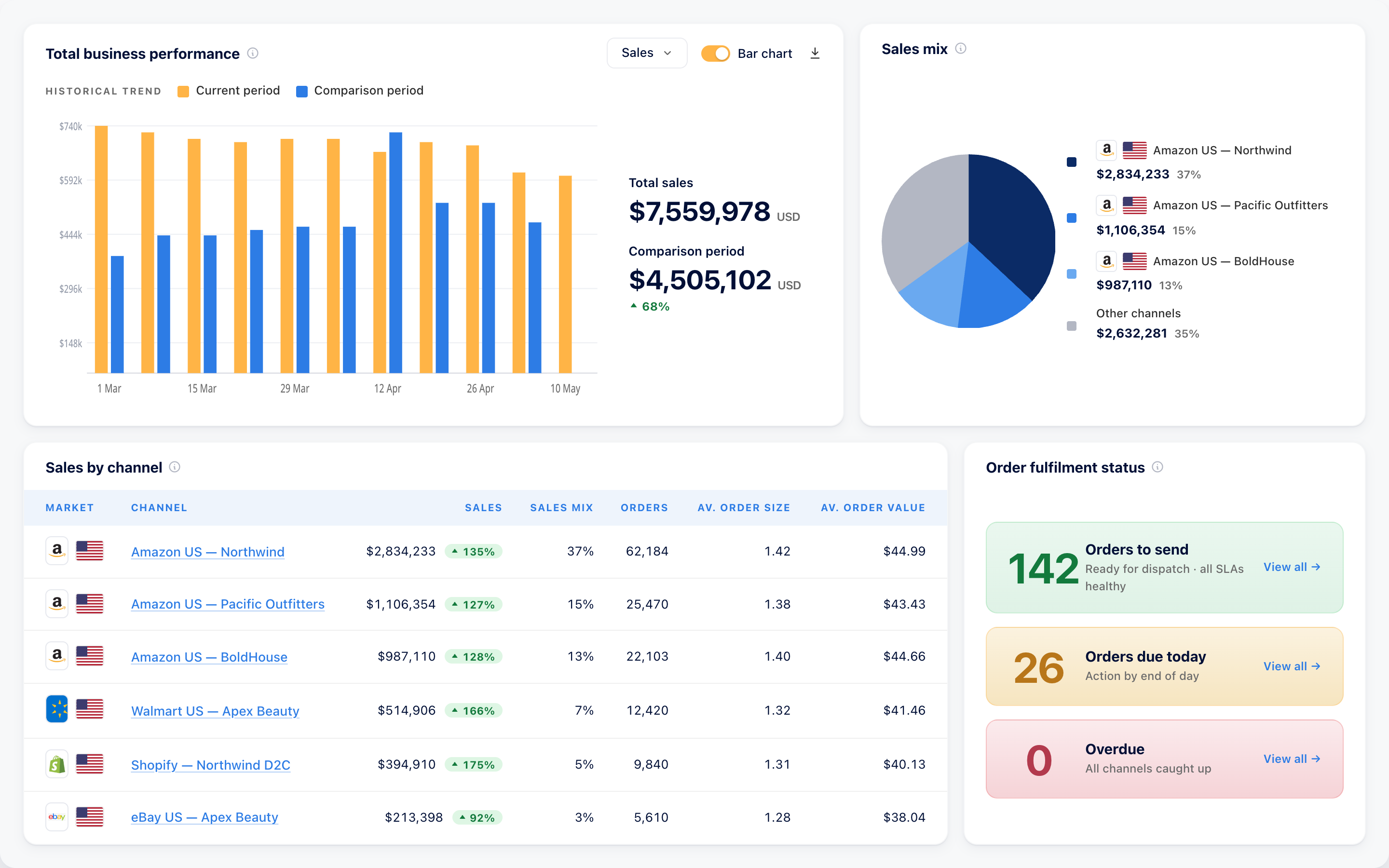
MerchantSpring sales overview showing sales trends, comparison periods, sales mix and channel performance

When a best seller slows down, know where to look

Before you change the ad budget or send more stock, bring the product’s sales, traffic, conversion and availability into the same view.

  • Are fewer shoppers finding you?

    Compare sessions and page views with sales, then check best seller rank and listing suppression to investigate a loss of visibility.

  • Are visits turning into orders?

    Review conversion and Buy Box performance alongside sales to see which products need a closer look.

  • Is stock or pricing limiting sales?

    Check inventory and days of cover, then drill into price and sales over time before deciding where to replenish or revisit pricing.

Bring the evidence to your next client call or team review

See the same product across every channel it sells on

Follow any of the 30+ metrics for the same product across the supported channels it sells on, using consistent definitions to compare performance over time.

See where it sells, where it’s out of stock and where it makes money before deciding where to invest or send inventory.

See how sales are moving before the next review

Built from underlying orders, Sales Insights gives you sales numbers sooner than many marketplace reports, with adjustments processed and restated faster as the picture changes.

Sales overview in MerchantSpring
Example MerchantSpring sales overview with a comparison-period chart, channel sales mix and sales by channel
30+metrics on every report
9Sales reports

Put sales changes in context with advertising and organic sales, profitability, conversion and stock in the same reports.

Sales Insights provides an earlier view than Amazon Seller Central’s business performance reports, helping you investigate before your next client call or team review.

MerchantSpring doesn’t just provide data; they empower smarter decisions, faster execution, and stronger outcomes for our clients.

Denny SmolinskiFounder & CEO, beBOLD Digital

From a sales change to your next move

Find the products that need your attention

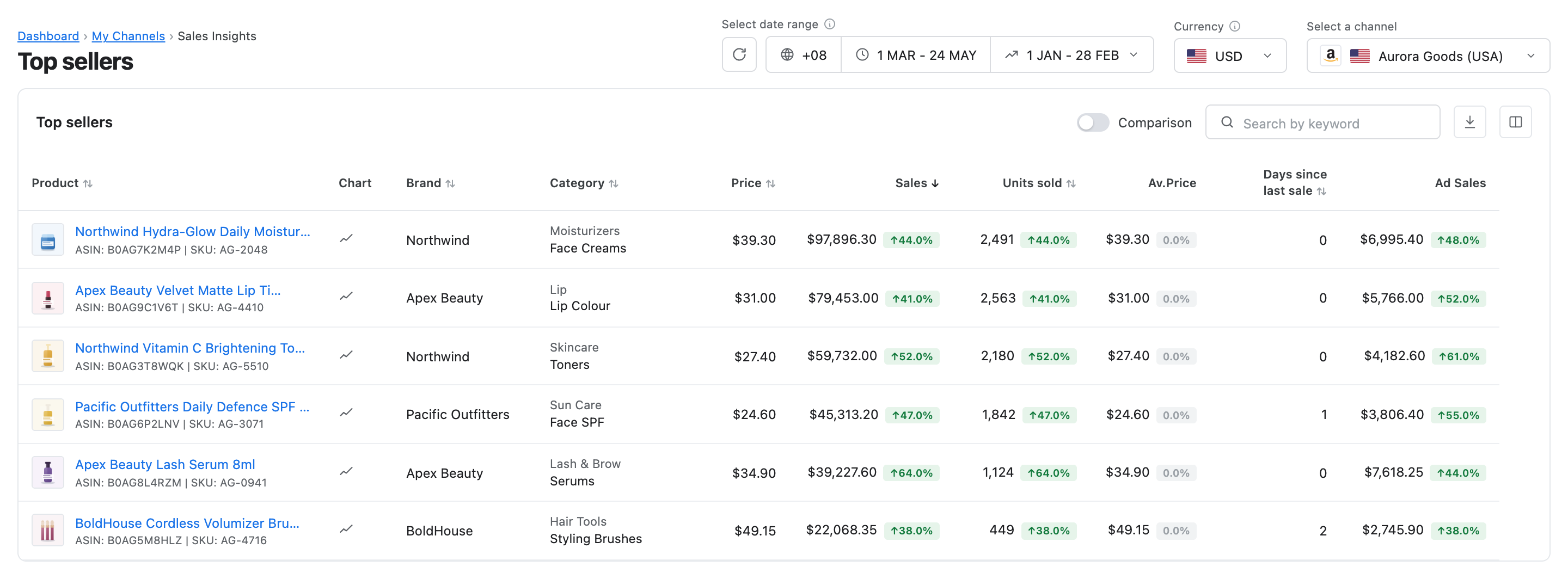
Use Top Sellers and Worst Sellers to focus your review, then look at how each product is performing over time. Prior values, differences and percentage changes help put the movement in context.

  • Follow sales trends in Sales by Period
  • Inspect SKUs in Sales by Product and roll variations up in Sales by Parent
  • Drill into price movements and sales for any product
MerchantSpring Top Sellers report showing product sales, units sold and comparison-period changes
Top Sellers in MerchantSpring · Demo data

Review the range you actually manage

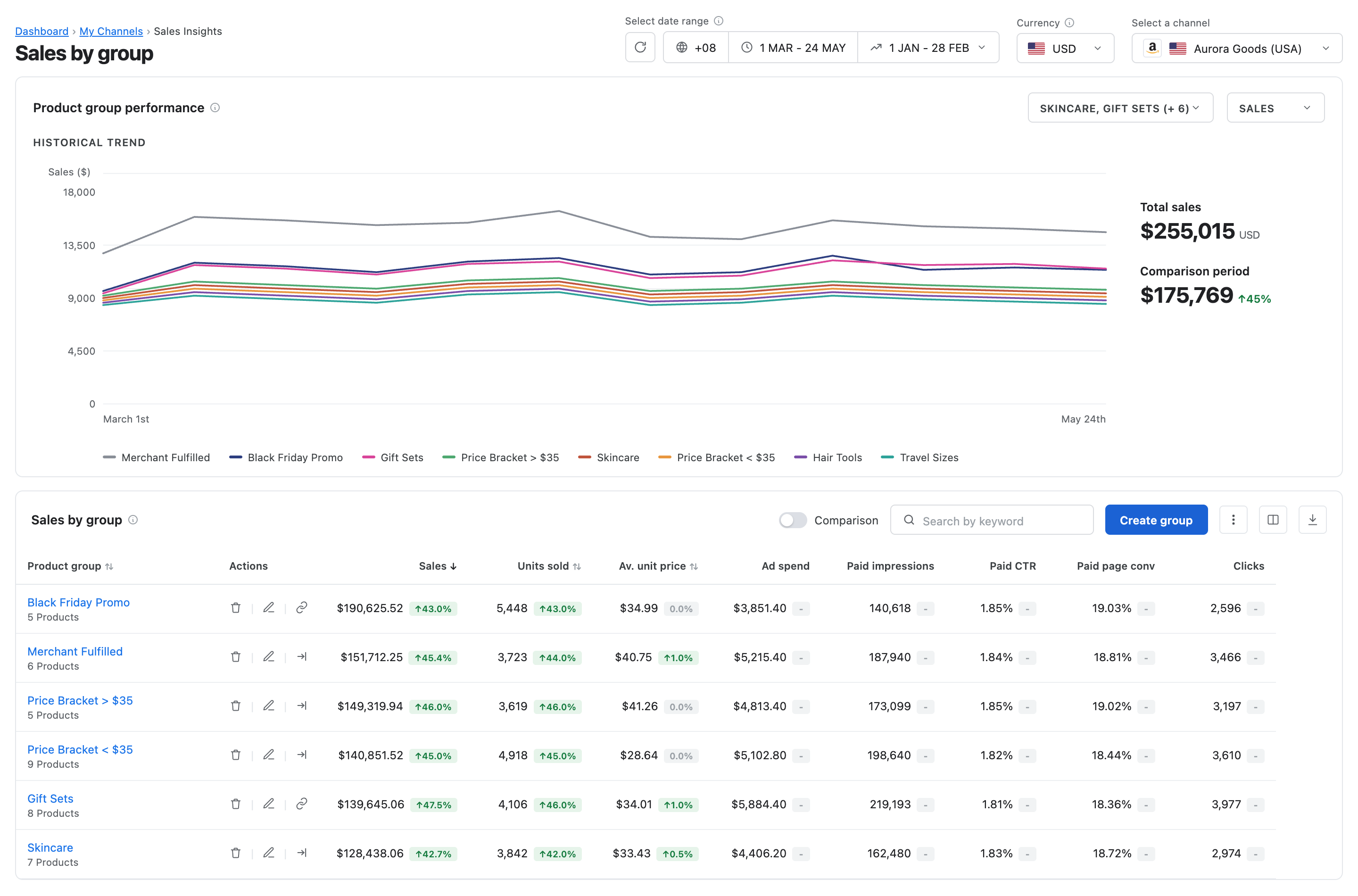
Review a client’s brand, seasonal range or colour variants together, with groups that follow the way your team manages the catalogue.

  • Compare brands and categories, or report on a custom set of SKUs in Sales by Group
  • Create and update groups in MerchantSpring or by file upload, with API Gateway and MCP options depending on your plan
  • Include the same product in multiple groups
Example MerchantSpring Sales by Group report showing product-group performance
Sales by Group in MerchantSpring · Demo data

Bring a clearer picture to your next review

Compare sales with the previous period, review units and pricing, and bring the changes into your next client call or team review.

  • Track sales and advertising against uploaded targets in Sales Budgets & Forecasts
  • Choose and sort the columns that matter to your review
  • Ask sales questions in Claude or ChatGPT via MCP, or use API Gateway to power your own tools and workflows (plan dependent)
MerchantSpring Retail Analytics Ordered revenue report showing revenue trends, units, average price and product performance
Ordered revenue in MerchantSpring Retail Analytics · Demo data

See how these reports could support your next client or team review

Book a demo

One layer. Four ways to use it.

You should not have to reconcile one number for a dashboard, another for an API, and a third for AI. Each MerchantSpring surface starts from the same account and channel context.

Dashboards

Give operators one live view across accounts, brands, and channels, without rebuilding the portfolio in spreadsheets.

Explore the platform

Reports

Turn the same marketplace context into repeatable client and internal reporting, ready for the people who need the answer.

Explore reporting

API Gateway

Bring structured MerchantSpring data into internal tools, automations, and the applications your team builds.

Read the API docs

AI workflows

Connect supported AI tools to current marketplace context, within the account and channel scope the connection is allowed to use.

Claude ChatGPT Cursor Codex Gemini CLI VS Code and more supported
See the MerchantSpring MCP

Frequently asked questions

How does Sales Insights help me decide what to focus on?

Bring sales, traffic, conversion, Buy Box and stock together for each product. Use Top Sellers and Worst Sellers to find where to look, then investigate the signals behind the change before deciding your next move.

Can I compare the same product across marketplaces?

Yes. Follow any of the 30+ metrics for the same product across the supported channels it sells on, using consistent definitions. Country breakdowns help you compare international markets, while sales, profitability and stock show where to invest or allocate inventory.

Can I report on the products that matter to my team or client?

Yes. Review performance by product, parent, brand or category, or create a custom group for a seasonal range, launch or any set of SKUs. Products can belong to more than one group.

Will it help me see whether we’re on track?

Upload your budgets and forecasts to track sales and advertising performance against your targets. Comparison periods also show how results have moved, giving your next review a clear starting point.

Can I use the data in Claude, ChatGPT or our existing workflows?

Yes. Ask questions inside MerchantSpring with the AI Insights Agent, query sales in Claude or ChatGPT through MCP, or use API Gateway to power your own tools and workflows. Every report also exports to CSV. API Gateway and MCP access depend on your plan.

Is Sales Insights included in my MerchantSpring plan?

Yes, Sales Insights is part of every MerchantSpring plan. Book a demo to explore the reports with our team and discuss the API Gateway or MCP access you need.

See what’s behind your sales performance

Explore the products, channels and reporting questions that matter to your team in a Sales Insights demo.

Book a demo

Tell us a little about your business to get started.